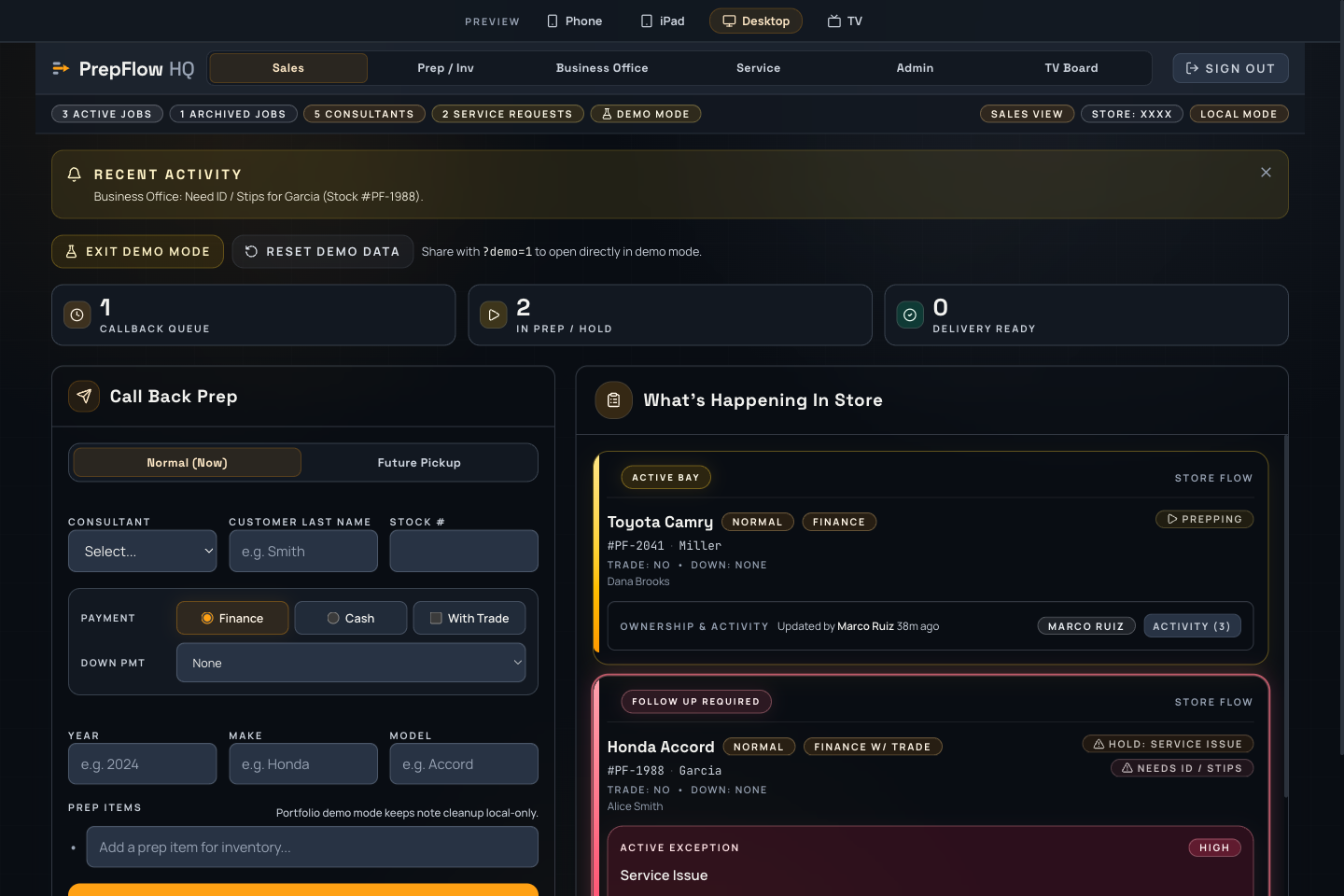
PrepFlow is a role-based dealership workflow dashboard built to keep vehicle prep,
paperwork, off-lot pulls, and day-end visibility in one place instead of scattered
across whiteboards, memory, and hallway conversations.
Dedicated screens for sales consultants, inventory, business office, service advisors, managers, and TV boards.
Demo focusHandoff workflow
Walk through the full call-back-to-delivery sequence in one meeting — no backend setup or account required.
Portfolio modeDemo-safe build
Opens directly with sample workflows. Explore Sales, Inventory, Business Office, Service, Admin, and TV without a store key or passcode.
PrepFlow · The sales team’s view of the handoff.
The friction
Vehicle delivery status gets scattered across intercom pages, whiteboards,
hallway conversations, and memory. Teams spend time finding out what happened,
who owns the next step, and whether a blocker is still waiting.
The project
A multi-role React dashboard with dedicated views for sales, inventory prep,
business office, service, admin oversight, and a TV board. The same vehicle and
handoff history stays visible as work moves between departments.
Key decision
Design around the handoff, not a generic task list. Each role sees the actions it
owns, while shared status and history make the next step legible across the store.
Current build
The portfolio demo opens directly with seeded workflow
data and no account setup. Server-only AI actions and production realtime services
stay off so the walkthrough is safe and repeatable.
Working proof
The workflow is role-based, so each handoff is shown from the actual team view.
The live demo path removes setup friction and lets reviewers test the flow immediately.
The same task can be traced from check-in to admin visibility in one walkthrough.
Demo sequence
Tell the story in three moves.
Start in Sales to show how a prep callback is requested and the delivery clock begins.
Switch to Inventory to demonstrate the task queue, pause controls, and status updates.
Move to Admin or TV mode to show how the same workflow stays connected across all stations.
Proof signals
What validates this concept fast.
Role-specific views map directly to the real departments and handoffs in a CarMax store.
Visitors can follow a delivery from callback to customer-ready without leaving the browser.
The TV board view makes accountability visible at a distance — exactly how it works on the floor.
Why it matters
Operational, grounded, and easy to test.
The problem it solves is real and immediately recognizable to anyone who has worked a dealership floor.
Demo mode makes it safe to share without backend setup or live data concerns.
Multi-role switching keeps the walkthrough focused on workflow, not just features.
The Problem
The goal is simple. The coordination to get there isn’t.
In a CarMax delivery flow, the customer-facing moment should feel simple: paperwork ready, car clean, yellow bow on the vehicle, and the customer smiling for pictures before driving away. But behind that moment, several departments have to move in sync.
The bottleneck is the handoff. A prep gets called back to inventory. Inventory waits for the sales consultant to drop it off. Once it is dropped off, inventory is on the clock to get the car prepped, cleaned, staged, and ready. At the same time, the business office needs to know what is coming, what to expect, and whether anything could delay paperwork.
Today, too much of that coordination depends on intercom pages, word of mouth, phone calls, or someone walking over to ask for an update. PrepFlow keeps “out of sight, out of mind” from taking over by making every important step visible in real time across all roles.
Who It’s For
Every department sees what they need to move the delivery forward.
Sales Consultants
A live delivery tracker that shows when prep is called back, when inventory receives the vehicle, when hidden steps are complete, and when the signing booth and customer-ready moment are close. Consultants can keep customers honestly updated, reduce uncertainty, and use the waiting time better instead of wondering where the prep is.
Inventory Associates & Lot Runners
A clear queue of vehicles called back, dropped off, or requested by another department. Once the consultant drops off the prep, inventory is officially on the clock: clean it, stage it, bow it, move it, or flag what is stopping progress — all without relying on intercom pages or radios.
Business Office
Early visibility into what deliveries are coming, where each prep stands, and what may affect paperwork before the customer reaches the signing booth. Prepare ahead of time, pause the process when something is missing, and avoid being surprised at the last minute.
Service Advisors
A simple way to call inventory for service-side tasks — off-lot vehicles, loaners, customer cars, or movement needs — without relying on radios or word of mouth. Inventory can accept, pause, complete, or flag the task so everyone knows what is happening and what is still waiting.
Store Managers
The live operating picture without walking department to department to build it manually. See which deliveries are moving, which are paused, who owns the next step, and where customer wait time may be building. Turn follow-up into coaching: remove blockers, rebalance work, and keep the delivery experience moving.
TV Boards
Large department displays that keep the important work visible. Each team can see what is waiting, what is paused, what just moved forward, and who owns the next step — keeping “out of sight, out of mind” from taking over during busy delivery windows.
Optional add-on
Recon / Service Technicians
For vehicles coming in from auction or trade, Recon can track the rejuvenation process from arrival through service, detail, and front-lot readiness — keeping the inventory team informed without manual check-ins.
Optional add-on
Buyers & Appraisers
Integration with the appraisal system could give buyers visibility into what happens with purchased vehicles after appraisal — including whether a unit is moving smoothly into inventory or needs early attention.
Technical Approach
Built for tablets, text updates, and big department TV boards.
React + Vite + Tailwind CSS
Fast, responsive screens for consultants, inventory, business office, and managers without adding native app deployment overhead. Every view is optimized for tablets and wall-mounted displays.
Realtime-ready architecture
The production architecture is designed for shared updates across role views. The public portfolio build keeps that service layer off and uses demo data for a repeatable walkthrough.
Demo mode
A store leader can walk through the full call-back-to-delivery workflow in one meeting: prep called, vehicle dropped, inventory clock started, business office notified, pauses handled, and final delivery cleared.
Multi-store direction
Store-scoped workflows are part of the product direction. District or regional visibility would require further implementation and validation.
Cost Reduction
Coordination overhead is a labor cost. Here’s the math.
Every delivery carries invisible overhead: intercom pages, walks across the store to check status, repeated “where’s that prep?” conversations, and time spent reconstructing what already happened. None of it moves the vehicle forward — it just finds out where things stand.
The intended benefit is less coordination overhead through shared status. If a store delivering 400 vehicles a month saved 12 minutes per delivery at a $28/hour loaded labor rate, that would represent about $27,000 a year in staff time. Those are assumptions to test in a pilot.
A pilot could also measure delayed deliveries, overtime, and customer wait time. Existing tablets, browsers, and TVs may be usable, but device compatibility and any rollout costs would need to be checked.
These figures are a modeled illustration, not measured results — the pilot plan below exists to replace this math with a store’s own baseline numbers.
Modeled savings — per store
Per delivery~12 min
Coordination overhead removed: pages, walk-overs, and manual status checks.
Per month~80 hrs
Staff hours recovered across sales, inventory, and the business office at 400 deliveries a month.
Per year~$27K
Recovered labor value at a $28/hour loaded rate — before soft savings.
New hardwareTo assess
Existing devices may be usable; confirm compatibility and rollout needs.
Fewer next-day delivery rolloversSoft savings
Less day-end overtime reconstructing statusSoft savings
Shorter customer waits at deliveryCSI protection
Pilot Validation
Measure the handoff before claiming the impact.
The product is designed to remove repeated friction: pages, walks across the store, manual status checks, missed handoffs, and time spent reconstructing what already happened.
A store pilot should establish the baseline first, then compare the same workflow after adoption. The portfolio does not present estimated savings as proven results.
The useful question is not whether another dashboard exists. It is whether the team spends less time finding status and more time moving the vehicle forward.